Apple does not want us to link from outside to a note although it makes sense to have a central notes management – there is no documented, public URL scheme for Apple Notes. Apple has never listed one in developer documentation, and there is no deep link from iCloud.com or from non-Apple platforms. But an undocumented mechanism exists and is reachable from outside the app. Just create a Shortcut
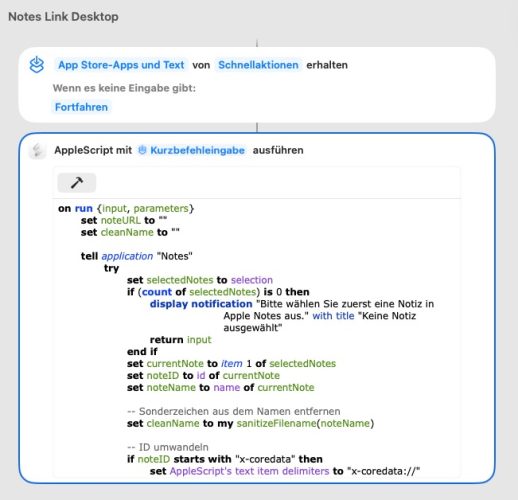
on run {input, parameters}
	set noteURL to ""
	set cleanName to ""

	tell application "Notes"
		try
			set selectedNotes to selection
			if (count of selectedNotes) is 0 then
				display notification "Bitte wählen Sie zuerst eine Notiz in Apple Notes aus." with title "Keine Notiz ausgewählt"
				return input
			end if
			set currentNote to item 1 of selectedNotes
			set noteID to id of currentNote
			set noteName to name of currentNote

			-- Sonderzeichen aus dem Namen entfernen
			set cleanName to my sanitizeFilename(noteName)

			-- ID umwandeln
			if noteID starts with "x-coredata" then
				set AppleScript's text item delimiters to "x-coredata://"
				set idPieces to text items of noteID
				set cleanID to item 2 of idPieces
				set noteURL to "applenotes://showNote?identifier=" & cleanID
			else
				set noteURL to noteID
			end if

			set the clipboard to noteURL

		on error errMsg
			display alert "Fehler beim Abrufen der Notiz: " & errMsg
			return input
		end try
	end tell

	-- Erstellt eine ausführbare .command Datei auf dem Schreibtisch
	if noteURL is not "" then
		try
			set desktopPath to POSIX path of (path to desktop folder)
			-- Wir nutzen .command als Endung für ein Desktop-Skript
			set filePath to desktopPath & cleanName & ".command"

			-- Schreibt den Start-Befehl direkt in die Datei
			set shellContent to "#!/bin/zsh
open " & quoted form of noteURL & "
"

			-- Datei erstellen und ausführbar machen (chmod +x)
			do shell script "echo " & quoted form of shellContent & " > " & quoted form of filePath
			do shell script "chmod +x " & quoted form of filePath

			display notification "Verknüpfung '" & cleanName & "' wurde auf dem Schreibtisch erstellt!" with title "Apple Notes"
		on error shellMsg
			display alert "Fehler beim Erstellen der Datei: " & shellMsg
		end try
	end if

	return input
end run

on sanitizeFilename(theText)
	set illegalChars to {":", "/", "\\", "*", "?", "\"", "<", ">", "|"}
	set cleanText to theText
	repeat with c in illegalChars
		set AppleScript's text item delimiters to c
		set thePieces to text items of cleanText
		set AppleScript's text item delimiters to " "
		set cleanText to thePieces as string
	end repeat
	if length of cleanText > 30 then
		set cleanText to text 1 thru 30 of cleanText
	end if
	return cleanText
end sanitizeFilename
CC-BY-NC Science Surf , accessed 02.09.2026