Category Archives: Software

How to save a Twitter thread

This is not a trivial task as most browser produce garbage when printing to pdf. Also screenshots do not help so much with multipage threads. “Unroll” also doesn’t work reliable.

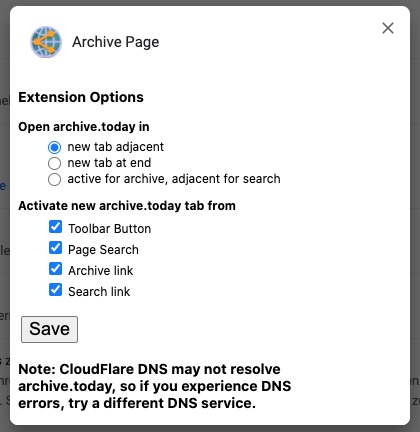
So I have been using the archive.today plugin before producing the pdf, but this method is time consuming as it needs a captcha.
Having now Selenium running in a docker container, there is a more convenient solution where just two lines of R are sufficient

remDr$navigate("https://twitter.com/SZ_Muenchen/status/1346425350394236930")
remDr$screenshot(file = 'screen.png')

Login is also possible as explained at github

username <- remDr$findElement(using = "name", value = "session[username_or_email]")
username$sendKeysToElement(list("XXX"))
passwd <- remDr$findElement(using = "name", value = "session[password]")
passwd$sendKeysToElement(list("XXX", "\uE007"))


CC-BY-NC Science Surf , accessed 19.09.2026

How to scrape a website with R I: Using a browser generated cookie

While there are quite some SO examples out there how to manage the login, here are the ncessary steps whenever you need to login in manually and have to start with a browser cookie. First install the “EditThisCookie” plugin in Chrome and export the cookie Continue reading How to scrape a website with R I: Using a browser generated cookie


CC-BY-NC Science Surf , accessed 19.09.2026
Better than a streamdeck: the Mac touchbar

I have been thinking to buy an Elgato Streamdeck as we have to lecture now also online during winter 2020.

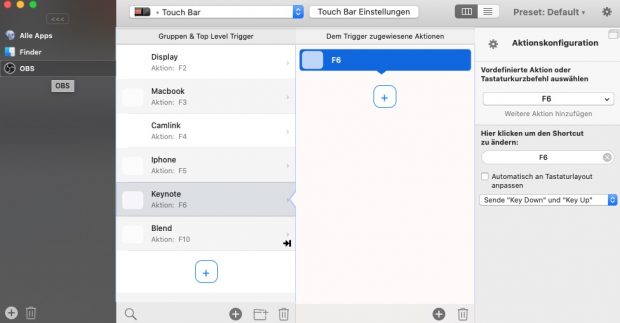
While the Streamdeck mini would be a nice addition to the Elgato 4 K Camlink (that connects the Nikon) as well as the Epoc Cam software (that connects the Iphone) for easy switching input channels, I ultimately decided against this solution and just reconfigured the Touchbar for OBS using Better Touch Tool.


CC-BY-NC Science Surf , accessed 19.09.2026
Live video projection over 30 meter

Here is a working hardware combination after several failed attempts – jerky moves, black screen, lost signal, color shifts.

Nikon Z6 – switch video toggle @back of camera for clean HDMI output, set video menu to 60 frames (to avoid display lag), setting c3 standby on. 1800€ incl FTZ.

Sirui VH-10X Fluid, 100€ used.

subtel external power supply for Z6 (only this one allows closing of battery compartment). 56€.

Rode VideoMicro Compact. 88€.

Elgato Cam Link 4K with short USB C connector (to avoid shear stress). 122€.

Macbook Pro with USB-C Digital-AV-Multiport-Adapter (other display port and hdmi did not show up as external display in OBS). adapter 72€.

PW-HT225PIR HDMI Extender with power adapter (USB power alone not sufficient, HDMI amplifier failes consistently). 30€.

30m Cat6 cable. 30€.

Short throw Optoma UHD42 4K Beamer – UHD. 1200€


CC-BY-NC Science Surf , accessed 19.09.2026

Laborjournal einzelne Artikel archivieren

Ist ganz einfach. Neuestes Heft herunterladen und splitten

# brew install ghostscript
gs -dBATCH -dNOPAUSE -q -sDEVICE=pdfwrite -dFirstPage=6 -dLastPage=9 -sOUTPUTFILE=Krull.pdf LJ_20_07.pdf
gs -dBATCH -dNOPAUSE -q -sDEVICE=pdfwrite -dFirstPage=14 -dLastPage=17 -sOUTPUTFILE=Antes.pdf LJ_20_07.pdf
gs -dBATCH -dNOPAUSE -q -sDEVICE=pdfwrite -dFirstPage=26 -dLastPage=29 -sOUTPUTFILE=Jaeger.pdf LJ_20_07.pdf
gs -dBATCH -dNOPAUSE -q -sDEVICE=pdfwrite -dFirstPage=34 -dLastPage=37 -sOUTPUTFILE=Jeschke.pdf LJ_20_07.pdf


CC-BY-NC Science Surf , accessed 19.09.2026
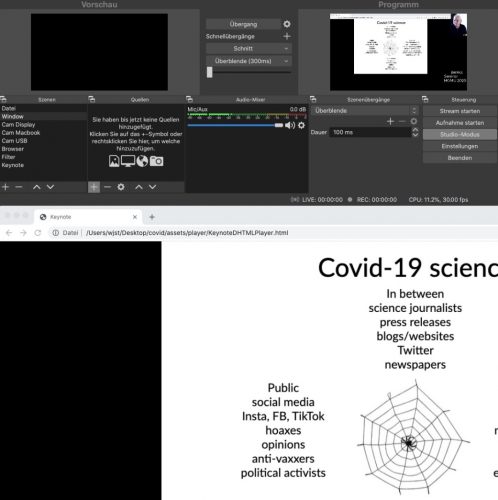
Unter MacOS Keynote streamen mit Video

  1. OBS installieren mit Virtual Camera Plugin
  2. Powerpoint/Keynote als HTML exportieren und in lokalem Browser aufrufen
  3. OBS Template erstellen mit Text, Kamerainput und Browserwindow
  4. Virtual Camera in OBS starten
  5. In zweitem Browserwindow Konferenz starten und Einstellungen > Sicherheitscheck > Website > Einstellungen > Konferenz > Virtual Camera auswählen

Neu:

  1. OBS installieren
  2. Keynote in Fenster wiedergeben
  3. OBS Template erstellen mit Text, Kamerainput und Fensterinput


CC-BY-NC Science Surf , accessed 19.09.2026
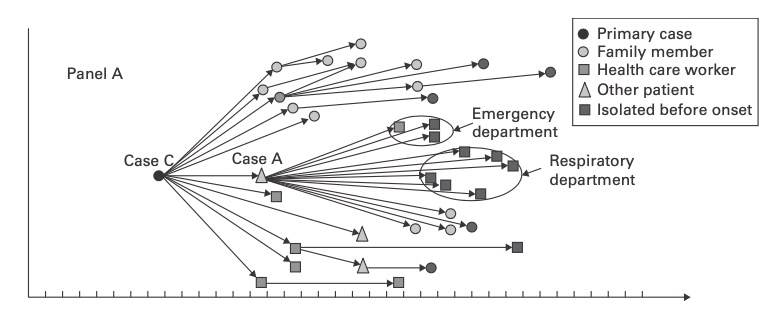
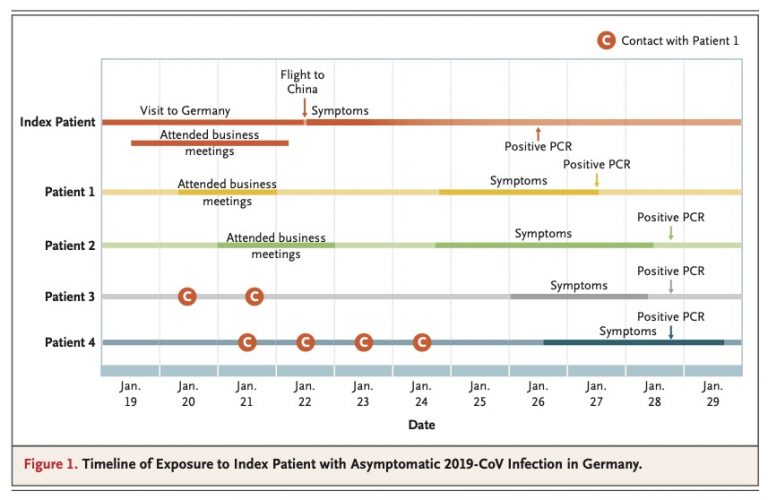
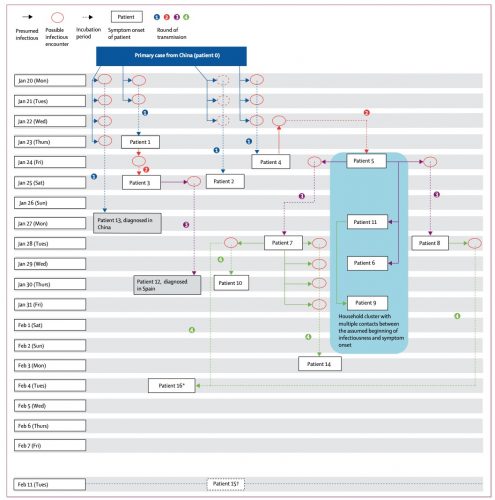
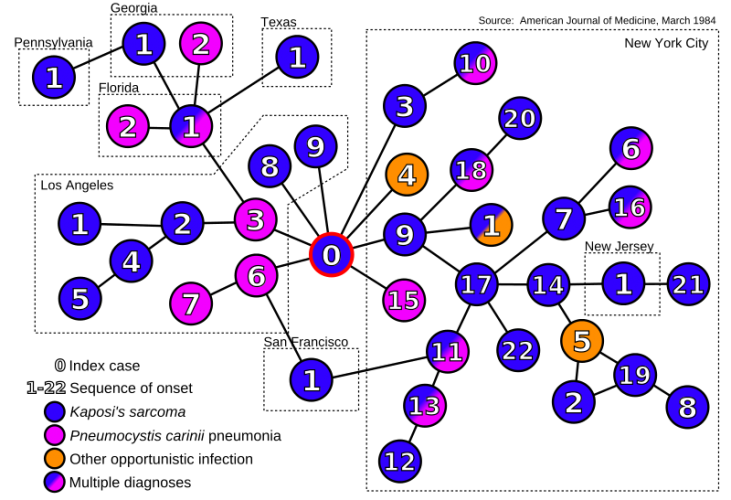
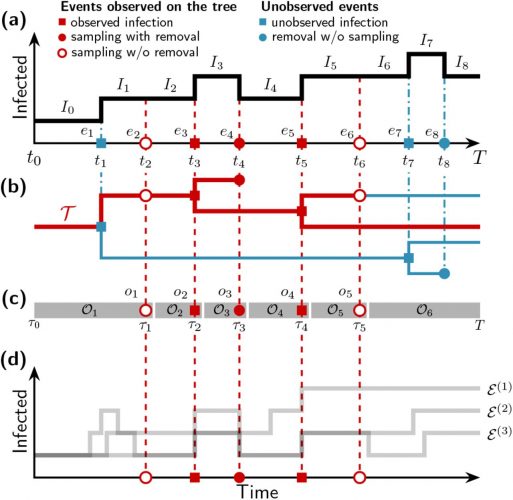
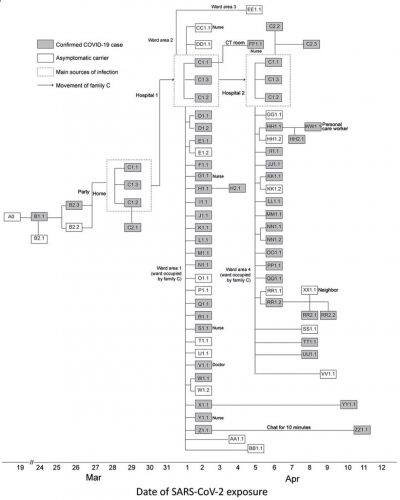
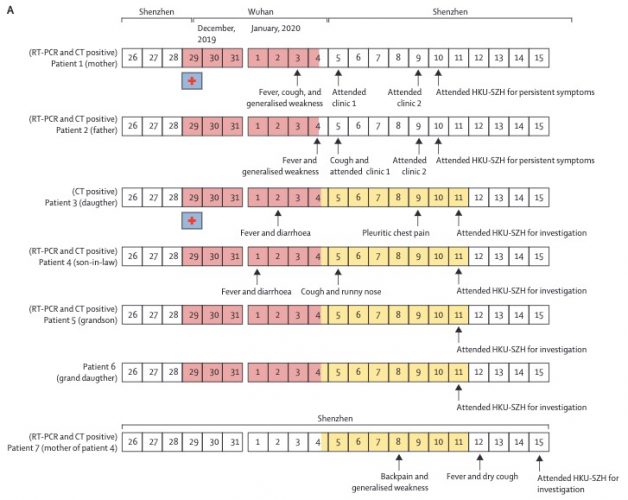
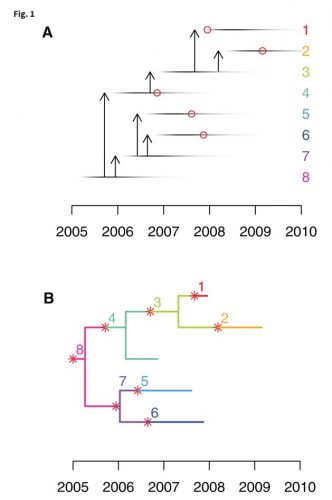
Graphical display of outbreaks: Transmission trees

Let’s start with some examples from the literature, find out necessary elements, compare different versions and develop a R template for general use.

“Exploding Stars”

CDC Field Epidemiology Handbook, 2019, ISBN 9780190933692 p115

“Tetris”

https://doi.org/10.1016/S0140-6736(20)30154-9 (2020)

“Clean Undeterministic”
“Clean Tree”

https://academic.oup.com/mbe/article/34/4/997/2919386

“Tree Addons”

https://openres.ersjournals.com/content/4/2/00162-2017

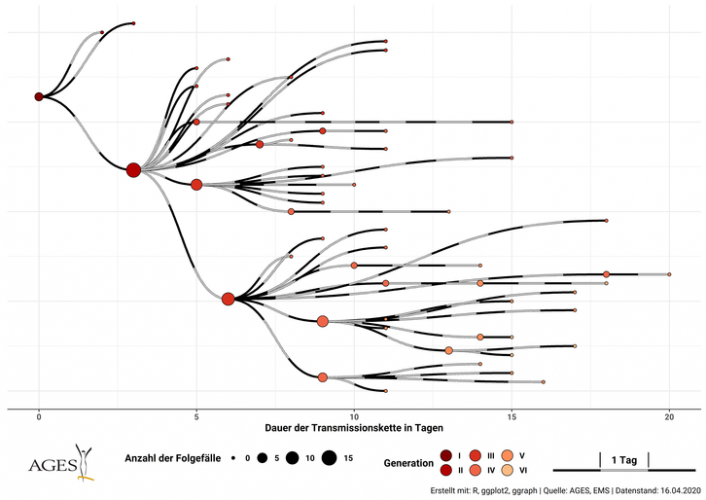
“Railways”

https://www.ages.at/service/service-presse/pressemeldungen/epidemiologische-abklaerung-am-beispiel-covid-19/

“Simple ”

https://www.ncbi.nlm.nih.gov/pubmed/32003551

“Vertical”

“star bus”

https://en.wikipedia.org/wiki/Index_case

“Mathematical”

https://www.biorxiv.org/content/10.1101/142570v3.full

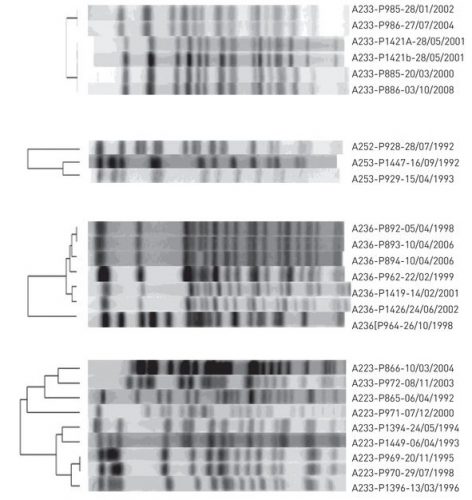
“Genetics”

https://wwwnc.cdc.gov/eid/article/26/9/20-1798_article


CC-BY-NC Science Surf , accessed 19.09.2026
From R to Python

It’s bit confusing if you are having long-term experience with R but need some OpenCV Python code. What worked for me

  1. download and install Python 3.8.3.
  2. pip install opencv-python
  3. pip install opencv-contrib-python
  4. although Spyder or Jupyter is recommended for data science, I went for PyCharm
  5. install Atom and follow the video instructions
  6. take care, numerous non working introductions out there, stick to recent version


CC-BY-NC Science Surf , accessed 19.09.2026
R leaflet – keep map in frame after closing info box

Although having some experience with leaflet before, it took me 5 hours to find out how to
(1) change the background color and
(2) re-center my map after the popup was panning the map basically out view. Here is my solution

leaflet(options = leafletOptions(
 zoomControl = FALSE,
 minZoom=6, maxZoom=6,
 centerFixed = TRUE) ) %>%
addPolygons(data = ds,
 fillColor = ~pal(AnzahlFall),
 color="black", weight = 1,
 fillOpacity = 0.7,
 label = ~name_2,
 popup = ~www,
 popupOptions = popupOptions( autopan=FALSE, keepInView = TRUE ) ) %>%
htmlwidgets::onRender("
 function(el, x) {
  var myMap = this;
  myMap.dragging.disable();
  myMap.on('popupclose', function(e) { myMap.panTo( {lon: 10.26, lat: 51.1} ) });
  var e = document.getElementsByClassName('leaflet-container');
  e[0].style.backgroundColor = 'white';	    
}")


CC-BY-NC Science Surf , accessed 19.09.2026
python3 cv2 installation

Homebrew is struggling with the older python 2.7 version that is missing ssl support. Python 3.8 did not recognize cv2 but this finally worked

brew install python3
brew postinstall python3
pip3 install virtualenv virtualenvwrapper
virtualenv env_name --python="python3"
/Users/wjst/env_name/bin/pip3 install opencv-python
/Users/wjst/env_name/bin/pip3 install pandas scipy matplotlib Pillow tqdm sklearn imageio
/Users/wjst/env_name/bin/python3 -c "import cv2"

then I could finally run the image forgery detection from Github.

cd /Users/wjst/Desktop/image-copy-move-detection-master
/Users/wjst/env_name/bin/python3
> from copy_move_detection import detect
> ...


CC-BY-NC Science Surf , accessed 19.09.2026
Was ist eigentlich Meinung, was ist Tatsachenbehauptung?

Volker Kitz erklärt den Unterschied

Was ist eine Meinung? Eine Meinung gibt ein persönliches Werturteil wieder. Das wesentliche Merkmal der Meinung ist: Sie kann nicht “richtig” oder “falsch” sein, man kann sie nicht ĂĽberprĂĽfen. Das unterscheidet die Meinung von der Tatsachenbehauptung. Sage ich: “Mein Nachbar prĂĽgelt seinen Hund”, lässt sich diese Ă„uĂźerung ĂĽberprĂĽfen, ist also eine Tatsachenbehauptung. Sage ich hingegen: “Der Lebenswandel meines Nachbarn ist inakzeptabel”, lässt sich das nicht ĂĽberprĂĽfen. Andere können das anders sehen. Es ist eine MeinungsäuĂźerung.

Das ganze ist deshalb so schwierig weil zuweilen Meinung und Tatsachenäußerung direkt in einander übergehen. Über eine Tatsachenbehauptung lässt sich manchmal sehr einfach auch eine Meinung transportieren.

Tucholskis “Soldaten sind Mörder” beinhaltet die Tatsache, dass Soldaten unter bestimmten Voraussetzungen andere Menschen töten (die Aussage ist also durch Art. 5 Abs. 1 GG gedeckt …).
Allerdings muss die Tatsache an sich stimmen. Mit unwahren Aussagen kann man sich nicht auf Meinungsfreiheit berufen.


CC-BY-NC Science Surf , accessed 19.09.2026